Beautifully at home.
A native Mac app, with familiar navigation, a proper inspector and a subtle glass finish. Light, dark, and the details that make it feel right.
⌘ DiskWeight
CRAFTED FOR MAC. MADE FOR CLARITY.
Big files. Forgotten folders. Space you didn’t know you had. See it all beautifully, and make room for what’s next.
Native for macOS 14+ · Apple Silicon & Intel
A clearer view.THAT “FULL DISK” FEELING? LET’S CHANGE IT.
Old exports. Huge installers. Projects you finished months ago. DiskWeight helps you find the weight, understand it, and decide what goes.
Space you can recover depends on your files. Scan sizes are estimates; shared APFS blocks and snapshots can affect the space actually released.
A BIG PICTURE. EVERY LITTLE DETAIL.
Follow a color. Explore a branch. Find the files that make the difference. A visual map turns a crowded disk into a clear next step.
Macintosh HD
SELECTED FOLDER
186.4 GB
Finished edits and original footage. Review the originals before removing anything.
Illustrative data. This demo does not scan, access or delete anything on your Mac.
CONFIDENCE LOOKS GOOD ON YOUR MAC.
A native Mac app, with familiar navigation, a proper inspector and a subtle glass finish. Light, dark, and the details that make it feel right.
⌘Search names and paths across a scan. Filter by file type, size or date. Explore large files and compare saved scans to see what changed.
↗Preview files, inspect full paths and build a cleanup plan. DiskWeight explains what it knows, and tells you when something needs a closer look.
◎Scans stay on your Mac. DiskWeight doesn’t upload your file inventory. Permission limits and unknown cloud states are shown openly.
⌑REAL APP. REAL ATTENTION TO DETAIL.
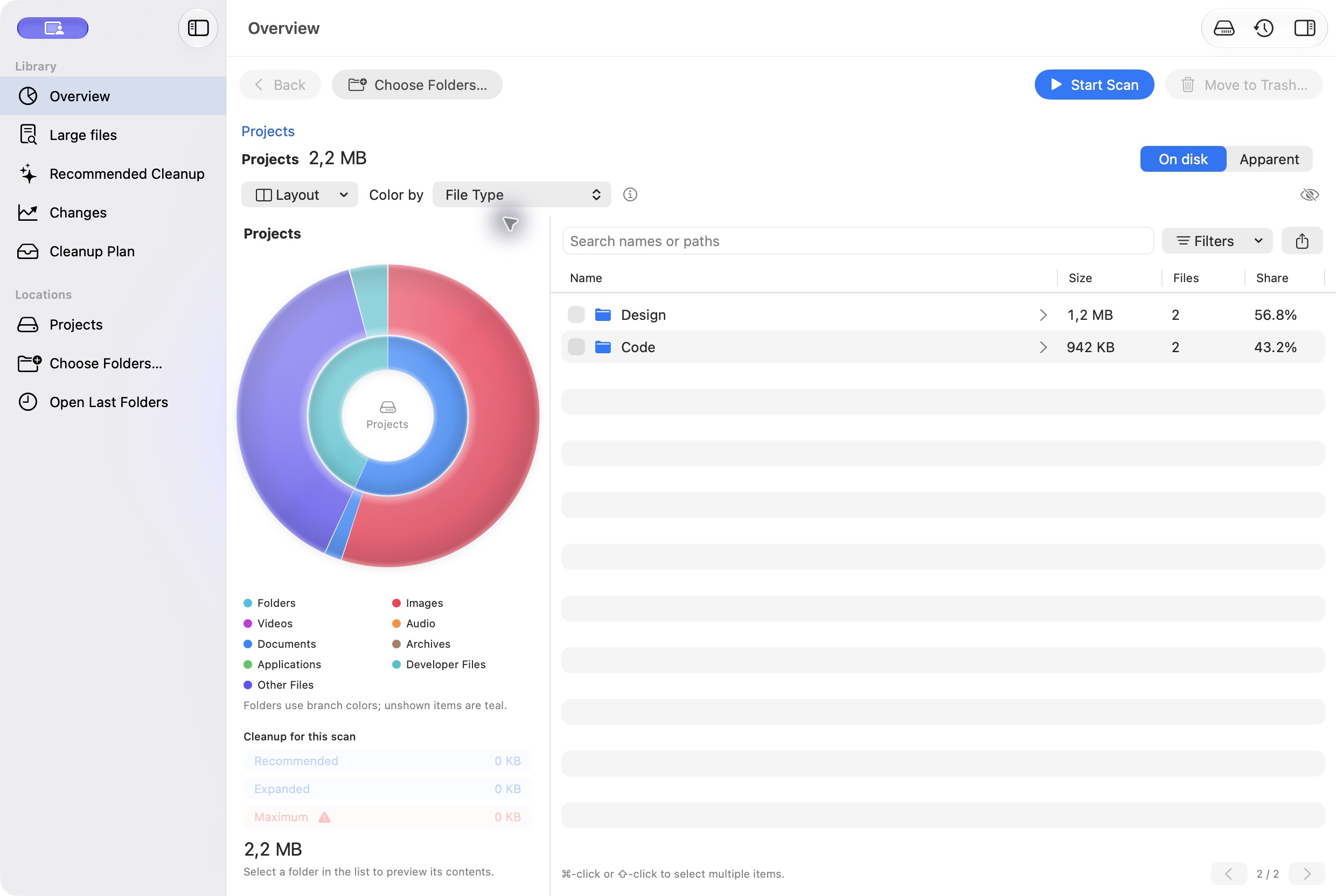
A focused workspace brings the map, your files and their details together. English and Spanish are built in.
COLOR, WITH CONTEXT
Keep the legend in view while you explore by file type. Switch to branch colors whenever the folder structure tells the better story.
SMALL DETAILS. REAL CONTROL.
Clear checkboxes, readable sizes and full inventory search. Select a folder to preview its contents; select several to prepare a reviewed cleanup plan.
IN THE CURRENT PREVIEW
Designed to help you see, understand and act. Every tool has a clear purpose.
Start with Scan Entire Disk, or choose several folders. Progress and cancellation keep long scans manageable; permission limits stay visible.
In the previewRadial or treemap. Color by branch or file type, with a visible legend in columns. Keep the complete, scroll-free chart above your files or beside them.
In the previewCheckboxes make multiple selection straightforward. Select a folder to preview its contents in the map; use Quick Look and Finder for a closer look.
In the previewSearch the complete scanned inventory, filter results, export CSV and compare saved scans. The simplified map is only the starting point.
In the previewRecommended, Expanded and Maximum show estimated removable allocation beside each option. One click opens a file-by-file review. Maximum is marked in red as risky.
In the previewExplanations cover caches, builds, backups, libraries and cloud files. Manual selections can go to Trash; recommended permanent cleanup requires explicit confirmation and cannot be undone.
In the previewA development preview, not a final release. Estimated allocation is not guaranteed recovered space. Recommended cleanup excludes cloud files, packages, hard links and protected locations.
A THOUGHTFUL NEXT CHAPTER
A focused roadmap shaped by real storage frustrations. These features are planned, not available in the current preview.
Find matching content, distinguish shared APFS storage and keep an original deliberately. A matching name alone will never count as proof.
Incremental rescans and browsable partial results, with clear coverage and a full-scan fallback when changes cannot be tracked reliably.
Custom exclusions and protected folders, more precise ownership rules and clearer reports of what was checked, skipped and actually recovered.
Direction, not a release-date promise. Features will be announced as they become ready.
SMALL PRICE. ROOM TO BREATHE.
Planned one-time pricing, starting at $9.99. Choose a pack for the Macs you want to keep a little lighter.
DiskWeight Solo
One Mac. One-time purchase.
The complete DiskWeight experience.
Visual maps · Full inventory search
Scan comparisons · Cleanup planning
English by default · Spanish in Settings
Planned launch pricing. Sales are not open yet. Taxes may apply. License and update terms will be published before purchase.
A FEW THINGS, CLEARLY.
It can help you find very large amounts of space when your Mac contains large files you no longer need. It cannot guarantee a particular result. You decide what to remove, and shared storage can affect the space actually recovered.
DiskWeight targets macOS 14 Sonoma and later, with a universal build for Apple Silicon and Intel. The app is in development; compatibility testing is still in progress. Public downloads are not available.
No. Scanning only reads file information. The preview offers system Trash for manual selections and three recommended cleanup levels. Permanent cleanup requires reviewing and selecting files, acknowledging the consequence and typing DELETE. It bypasses Trash and cannot be undone.
The planned purchase is a one-time payment, with packs for one to five Macs. Final license and major-version update terms will be available before checkout opens.
ROOM FOR WHAT MATTERS.
A paid app, thoughtfully designed for Mac. Launch pricing starts at US$9.99. Sales open when the release is ready.
View license packs ↗Coming soon · macOS 14+ · Apple Silicon & Intel